A QR code stores data as a grid of dark and light squares called modules. Three large corner squares let a camera find and orient the code, and built-in error-correction data lets it rebuild content even if part of the code is damaged.
QR stands for “quick response”. The format was created in 1994 by Denso Wave, a Toyota subsidiary, to track parts on a factory line, where ordinary barcodes were too slow and held too little. A barcode reads in one direction and stores roughly a dozen digits. A QR code stores data in two directions, so the same space holds hundreds or thousands of characters, and a camera can read it from any angle.
The anatomy of a QR code
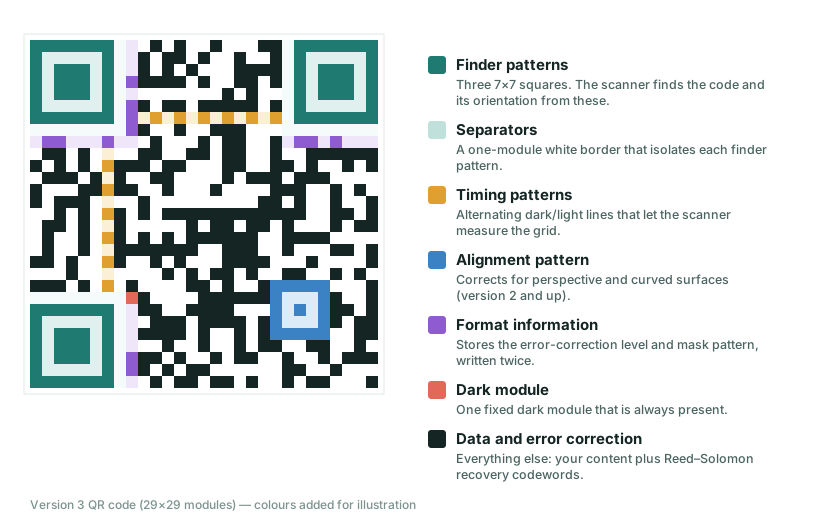
Every QR code, whatever it contains, is built from the same set of parts. The diagram below shows a version 3 code (29×29 modules) with each region colour-coded.
Finder patterns: “this is a QR code, and this is its orientation”
The three large squares in the corners are the finder patterns. Each has a dark ring, a light ring and a dark centre, which produces a 1:1:3:1:1 ratio of dark to light to dark to light to dark along any line through the middle. That ratio was chosen because it is unusual in printed material, so a scanner can spot it quickly and rarely mistakes something else for a code. Because there are only three, with the fourth corner left empty, the camera also knows which way is up, even if you hold the phone sideways.
Timing and alignment patterns: measuring the grid
Two lines of alternating dark and light modules run between the finder patterns. They act like the markings on a ruler so the scanner can work out the exact spacing of the grid. Larger codes (version 2 and up) also have one or more small alignment patterns that correct for perspective, so a code on a curved bottle or a poster seen at an angle can still be read.
Format information: the settings
Two strips next to the finder patterns record the error-correction level and the “mask” used. The mask is a pattern that is applied across the data area to avoid large blocks of one colour or accidental finder-like shapes. The format data is stored twice so it survives damage.
Data and error correction
Everything else is your content plus recovery codewords produced with a Reed–Solomon code, the same family of mathematics used to protect data on CDs and in space communication. This is why a code with a coffee stain or a small tear can still scan. Four levels (L, M, Q, H) trade code density for recovery capacity; they are covered in error correction levels explained.
Versions: how QR codes grow
There are 40 versions. Version 1 is 21×21 modules and each version adds four modules per side, so version 10 is 57×57 and version 40 is 177×177. A short web address fits in version 2 or 3. The larger the data, the denser the code, and the larger you must print it. Our capacity checker tells you which version your text needs, and this guide has the full capacity table.
What happens when you scan
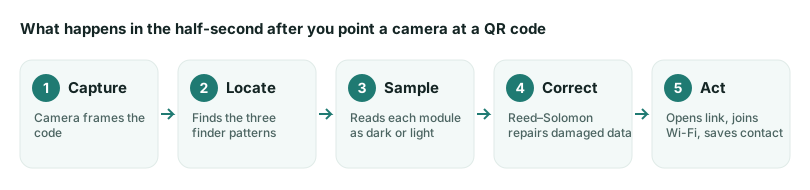
- Capture. The camera takes frames continuously; there is no shutter button.
- Locate. Software searches each frame for the 1:1:3:1:1 finder pattern in three places.
- Sample. Using the timing and alignment patterns, it reads every module as dark or light, correcting for tilt and distortion.
- Correct. The mask is removed and the Reed–Solomon code repairs any misread modules.
- Act. The decoded text is interpreted. A string beginning
https://becomes a link,WIFI:becomes a network join prompt, andBEGIN:VCARDbecomes a new contact.
That last step matters: a QR code does not contain an “instruction”. It contains text. The phone decides what to do with it, and a good phone shows you the destination before opening it. That is the basis of the safety advice in our QR code security guide.
Why QR codes work so reliably
- Redundancy. Error correction means perfection is not required.
- Self-describing layout. The code carries its own orientation, grid and settings.
- Open standard. The format is defined in ISO/IEC 18004, and Denso Wave chose not to enforce its patent, so anyone can generate and read codes freely.
Where it can go wrong
Most failures come from print and layout rather than from the code itself: too little contrast, no blank border, a code printed too small for the distance, or content so long that the squares become tiny. Each of these has its own guide: colours and contrast, print size, and common mistakes.
When you are ready to make one, the QR code generator shows the version, grid size and contrast warnings as you type.
Frequently asked questions
Can a QR code contain a virus?
No. A QR code holds text, nothing executable. The danger is the destination it points to, such as a phishing page. See our security guide for how to check a link before opening it.
Does scanning a QR code need an internet connection?
Reading the code does not. The camera decodes it on the device. What happens next may need a connection: opening a website does, while showing text, saving a contact card or joining a Wi-Fi network do not.
Is “QR Code” a trademark?
Yes. “QR Code” is a registered trademark of Denso Wave. The technology itself is an open standard, ISO/IEC 18004, and Denso Wave has said it will not enforce its patent rights for codes made to that standard.
Try it: QR Code Generator — Create QR codes for links, text, Wi-Fi, contacts, email, phone and SMS. Download PNG or SVG.
Keep reading
Our guides give general information based on QR specifications, calculations and worked examples. Results depend on your printer, materials and devices, so always test a real print. See our editorial policy.