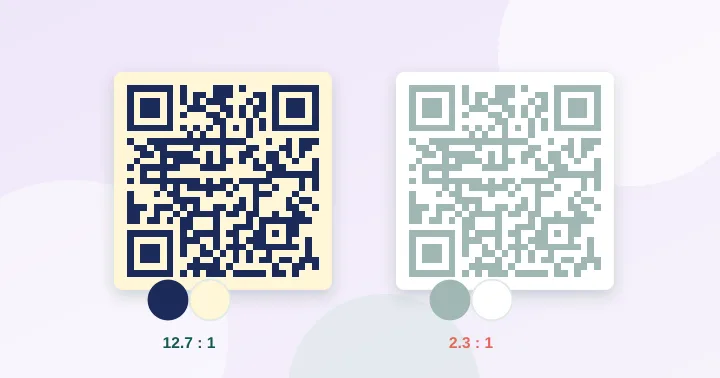
Use dark modules on a clearly lighter background and aim for a contrast ratio of at least 4.5:1. Avoid light-on-dark (inverted) codes, low-contrast tints, and busy photo backgrounds. Brand colours are fine as long as the code remains obviously darker than its background.
A scanner does not see colour the way you do. It converts the camera image to something close to greyscale, decides which modules are dark and which are light, and then decodes. Anything that makes that dark/light decision harder, such as a pale foreground, a gradient or a patterned background, raises the chance of a failed scan.
Measuring contrast
The standard QR specification defines symbol contrast using reflectance measured by dedicated equipment. For everyday design work the most convenient measurable proxy is the WCAG contrast ratio, which compares the relative luminance of two colours on a scale from 1:1 (identical) to 21:1 (black on white). Our contrast checker calculates it as you pick colours.
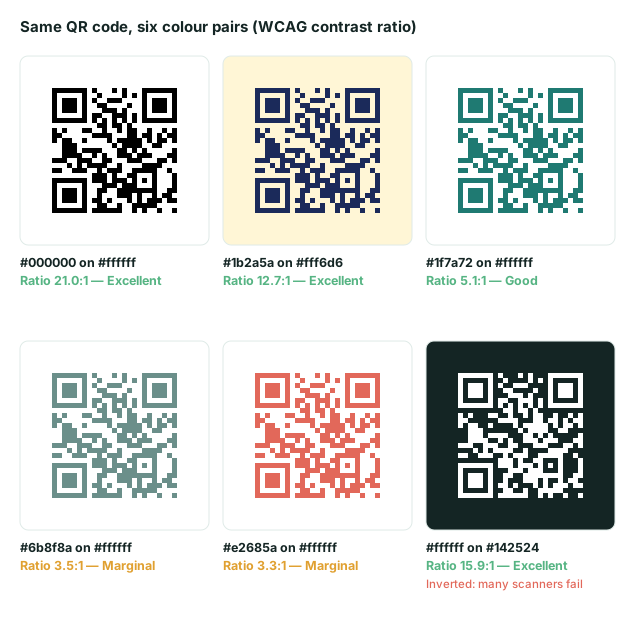
| Colour pair | Ratio | Verdict |
|---|---|---|
| Black on white | 21.0:1 | Excellent |
| Navy #1b2a5a on cream #fff6d6 | 12.7:1 | Excellent |
| Teal #1f7a72 on white | 5.1:1 | Good |
| Grey-green #6b8f8a on white | 3.5:1 | Marginal |
| Coral #e2685a on white | 3.3:1 | Marginal |
| White on near-black #142524 | 15.9:1 | High ratio, but inverted |
The thresholds in our checker (7+ excellent, 4.5–7 good, 3–4.5 marginal, below 3 poor) are our own rule of thumb, chosen because they are easy to measure and err on the cautious side. They are not part of the QR standard. A marginal result is not a guarantee of failure; it is a prompt to test on several phones in dim light.
Inverted codes
The specification expects dark modules on a light background. A light code on a dark background is an “inverted” code. Many modern phone cameras read these, but older scanner apps, point-of-sale scanners and some embedded readers do not. If a design demands inversion, test it on at least three devices, and consider offering a dark-on-light alternative nearby.
Brand colours, gradients and backgrounds
- Single brand colour. Works if it is dark enough. Navy, deep green, burgundy and charcoal are good; yellow, light orange and pastel tints are not.
- Gradients. A gentle gradient between two dark colours is usually fine. A gradient that passes through a light colour makes some modules disappear.
- Background images. Keep the area behind the code a plain light colour. A photograph, even if faint, adds noise to the dark/light decision.
- Transparent PNGs. A transparent background takes on whatever sits behind it. Place the code on a solid white panel to be safe.
- Different colours for the finder patterns. Allowed by the designers of many branded codes, but keep them as dark as the rest and test.
Print considerations
Screen colours (RGB) and print colours (CMYK) differ. A colour that looks dark on screen can print lighter than expected. For the best result ask your printer for a rich dark or pure black for the modules. Glossy paper and laminate create reflections that lower the apparent contrast under strong light; matte stock is more forgiving.
Dedicated red-laser barcode scanners, common in warehouses and some shops, see red as white, so a red code on white can be invisible to them even though phones read it. If a code may be scanned by retail hardware, stay with black or dark blue.
A quick workflow
- Pick your colours and check the ratio in the checker. Aim for 4.5:1 or higher.
- Generate the code at the size you plan to print with the QR generator, which shows a live warning if contrast is low.
- Print a test, scan with two phones, then scan again in dim light.
For other print problems see common QR code mistakes.
Frequently asked questions
Why does my code scan on screen but not on paper?
A screen emits light, which gives strong contrast even for pale colours. Printed ink only reflects the light around it, so a colour that looks fine on a monitor can be too faint on paper, especially in dim rooms or under glare.
Can I print a QR code with metallic foil or in a single spot colour?
A dark spot colour on a matte light stock can work well. Foil and metallic inks reflect light unpredictably, so avoid them for the code itself and test on real stock if the design requires them.
If the contrast ratio is high, is a white-on-black code fine?
The ratio does not fix polarity. A high-ratio inverted code can still fail on scanners that expect dark modules on a light background. Use the ratio together with the inverted warning.
Repeat the colour calculation
Try #000000 on #FFFFFF in the contrast checker: the luminance ratio is 21:1. Identical colours give 1:1. Reversing white and black still gives 21:1 mathematically, but reverses the polarity of the QR. That is why the tool checks polarity separately from the ratio.
The public verification page reruns these checks. A WCAG text contrast ratio is useful for inspecting colours; it does not certify QR readability. Camera processing, ink, reflections and the final printed margin still matter.
Try it: QR Contrast Checker — Check whether your QR colours have enough contrast to scan, with a live preview.
Keep reading
Our guides give general information based on QR specifications, calculations and worked examples. Results depend on your printer, materials and devices, so always test a real print. See our editorial policy.