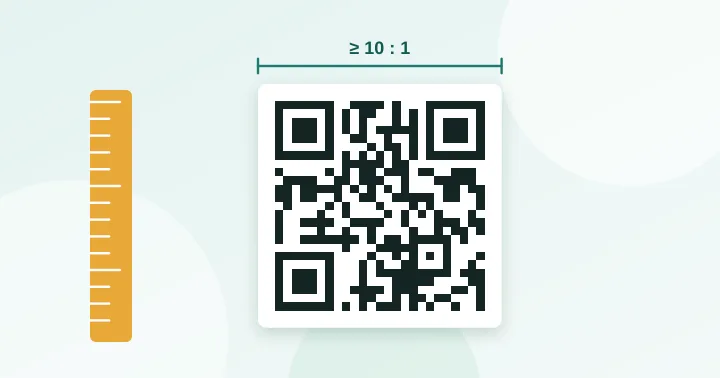
Print the code at least one tenth as wide as the distance people will scan from: 3 cm at 30 cm, 10 cm at 1 m, 30 cm at 3 m. Keep a blank border of four modules around it, and make it bigger if your content is long, because long content means smaller squares.
A QR code that is too small is the single most common print failure. People see the code and cannot get it to scan, or it scans only when they lean in. The cause is almost always size relative to distance, not the code itself.
The 10:1 rule
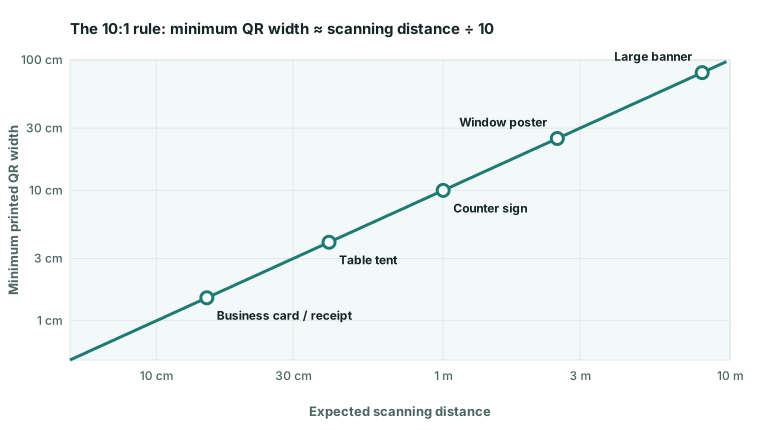
A widely used rule of thumb for phone scanning is a distance-to-width ratio of roughly 10:1. Scan from 20 cm and the code should be about 2 cm wide; scan from 2 m and it should be 20 cm. The reasoning is simple geometry: the camera needs the code to fill enough of its frame for every module to span several pixels. This is a guideline for modern smartphones, not a standard, and it assumes decent lighting and a flat surface.
Reference sizes
| Material | Typical distance | Minimum width |
|---|---|---|
| Business card, receipt | 10–20 cm | 2 cm |
| Product label, packaging | 20–30 cm | 2.5–3 cm |
| Table tent, menu board | 30–40 cm | 3–4 cm |
| A4/Letter flyer or poster | 40–60 cm | 4–6 cm (larger is better) |
| Counter sign | 1 m | 10 cm |
| Shop-window poster | 2–3 m | 20–30 cm |
| Banner or billboard | 5–10 m | 50 cm–1 m |
These widths are for the code itself. Add the quiet zone on top.
The density rule: why long content needs a bigger code
The 10:1 rule assumes a fairly simple code. If your content makes a dense grid, the individual squares shrink. A 25×25 code printed 3 cm wide has modules of 1.2 mm; the same 3 cm with a 57×57 grid has modules of about 0.5 mm, and with a 77×77 grid only 0.39 mm. At that point you are fighting printer resolution and paper texture as well as camera distance.
We use a conservative floor of 0.4 mm per module. If your code would fall below it, either print larger or shorten the content. The QR size calculator applies both rules to your actual text and reports which one is limiting you.
| Content | Grid | Width needed for 0.4 mm modules |
|---|---|---|
| Short link (version 2) | 25×25 | 1.0 cm |
| Link with a path (version 4) | 33×33 | 1.3 cm |
| Link with tracking (version 7) | 45×45 | 1.8 cm |
| Long link (version 11) | 61×61 | 2.4 cm |
| Very long link (version 15) | 77×77 | 3.1 cm |
The quiet zone
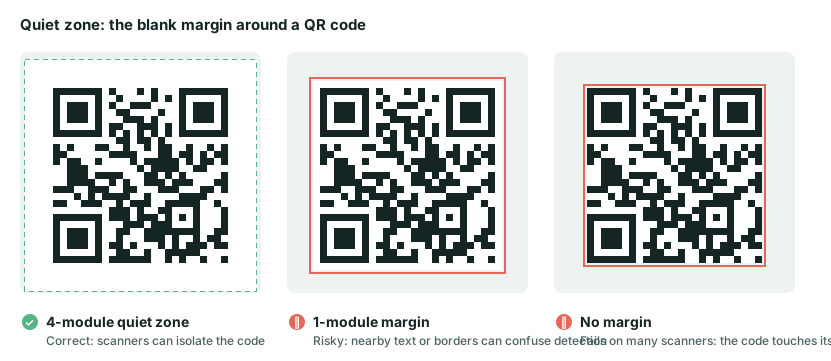
The specification asks for a blank border four modules wide on all sides. Beyond that: keep text and graphics outside it, avoid placing the code over a busy photograph, and do not crop it tight to the edge of a sticker. If your design has a coloured panel behind the code, the panel counts as background and must be light and uniform.
Other factors that effectively change the size you need
- Curved surfaces (bottles, cups, cans) distort the code, so go larger and prefer error-correction level Q or H.
- Glossy finishes reflect light; under shop lighting, laminate can wipe out the contrast. Matte is safer.
- Angled viewing, such as a poster scanned from the side or a code on a table scanned from a standing position, effectively shrinks the code.
- Low light reduces camera sharpness; add margin by going 20–30% bigger for dim venues.
Exporting the file correctly
Use SVG for print so the code stays sharp when enlarged. If you need a PNG, export it at a whole number of pixels per module (for example 8 px per module, not 7.6) so no edges are anti-aliased. The calculator shows the exact pixel size for your chosen resolution; at 300 DPI a 2.5 cm print (quiet zone included) of a version 3 code, which is 29 modules plus 8 modules of margin, works out to about 8 px per module.
Finally, print one copy at the real size and scan it with two different phones from the real distance. That 30-second test catches nearly every problem. For a full checklist, see common QR code mistakes.
Frequently asked questions
Does a bigger QR code always scan faster?
Up to a point. A larger code gives more tolerance for distance and print quality. Once it comfortably fills the camera view, extra size adds nothing, and an oversized code seen from very close can be hard to frame.
What is the smallest QR code that works on a phone?
It depends on content and conditions. A very simple code can scan at about 1 cm wide from close range in good light, but we recommend at least 2 cm for anything handed to a customer, because real-world lighting and print quality are rarely ideal.
Does the size include the blank border?
No. The 10:1 rule applies to the code itself. The four-module quiet zone is extra, so reserve space for both. The size calculator shows each figure.
A size calculation you can reproduce
Enter HELLO WORLD in the size calculator, choose correction level M and a distance of 30 cm. The encoder uses a version-one, 21-module symbol. The distance rule gives a 30 mm symbol; the density floor gives 21 × 0.4 = 8.4 mm, so distance controls this example.
Each module is 30 ÷ 21 = 1.429 mm. Including four modules on each side, the full width is 29 × 1.429 = 41.43 mm. At 300 DPI, rounding up to whole pixels per module gives 17 pixels per module and a 493-pixel export. This is a planning calculation, not a measured scan distance. Use the print approval sheet on the final material.
Try it: QR Size Calculator — Work out the minimum print size for a QR code from the scanning distance and data length.
Keep reading
Our guides give general information based on QR specifications, calculations and worked examples. Results depend on your printer, materials and devices, so always test a real print. See our editorial policy.