How the ratio is calculated
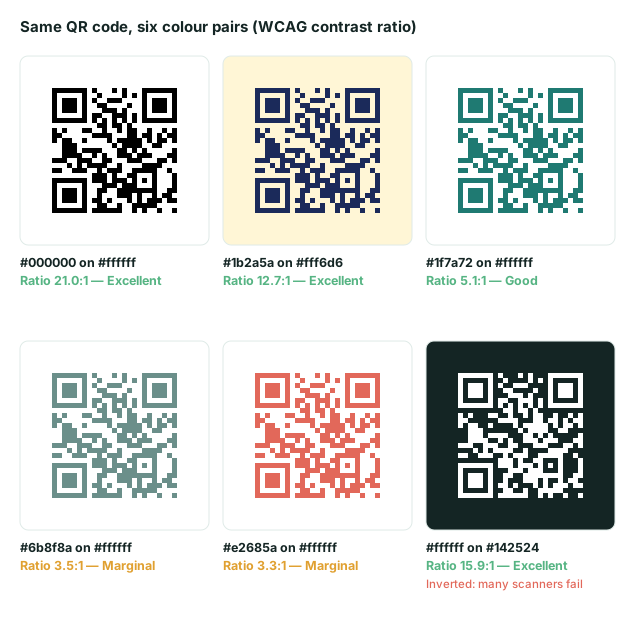
The checker uses the WCAG 2.x formula. Each colour is converted to relative luminance: the red, green and blue channels are linearised, then weighted 0.2126, 0.7152 and 0.0722 because the eye is most sensitive to green. The ratio is (lighter + 0.05) ÷ (darker + 0.05). Black on white scores 21:1; identical colours score 1:1.
What the verdicts mean
| Ratio | Verdict | Advice |
|---|---|---|
| 7:1 and above | Excellent | Safe for almost any print and lighting. |
| 4.5:1 – 7:1 | Good | Fine for most uses. Check glossy paper. |
| 3:1 – 4.5:1 | Marginal | Test several phones in dim light before printing. |
| Below 3:1 | Poor | Likely to fail. Darken the code or lighten the background. |
These thresholds are our rule of thumb, not part of the QR standard. The standard itself measures symbol contrast with specialised equipment. Treat the ratio as a fast warning system and a real scan as the final verdict.
For the reasoning behind these colour rules, including brand colours, gradients and background images, read QR code colours and contrast.
Frequently asked questions
What contrast ratio does a QR code need?
There is no single official number for consumer scanning. We use the WCAG ratio as a measurable proxy: 4.5:1 or more is a safe target, 3–4.5:1 is marginal, and under 3:1 often fails, especially in dim light or on glossy paper. The only reliable test is scanning a real print.
Can I use light modules on a dark background?
Sometimes, but not reliably. The standard expects dark modules on a light background. Newer phone cameras often read inverted codes, but older scanner apps and many in-store scanners do not. If you must invert, test on several devices.
Why does a bright colour like red or orange fail?
Perceived brightness matters more than hue. Saturated red and orange have a low luminance difference against white, so they score poorly even though they look vivid.
Is the ratio the same as how well it scans?
No. Contrast is one factor. Print quality, paper finish, lighting, module size and camera quality also matter. A high ratio makes failures less likely but does not guarantee a scan.
Related tools
QR Code Generator
Create QR codes for links, text, Wi-Fi, contacts, email, phone and SMS. Download PNG or SVG.
QR Size Calculator
Work out the minimum print size for a QR code from the scanning distance and data length.
QR Capacity Checker
Paste a URL or text to see the QR version, grid size and error-correction options it needs.