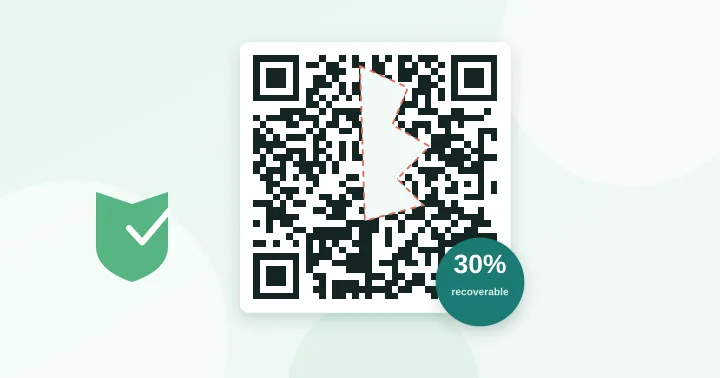
Error correction adds recovery data to a QR code. Level L recovers about 7% damage, M about 15%, Q about 25% and H about 30%. Higher levels make the code denser. Level M is the right default for print; use H only if the code will be worn, dirty or carry a logo.
Every QR code carries more data than the message you typed. Alongside your content it stores recovery codewords calculated with a Reed–Solomon code. If some modules are unreadable, the decoder uses the extra data to work out what was lost. You choose how much recovery to include when you create the code.
The four levels
| Level | Name | Recovers up to | Typical use |
|---|---|---|---|
| L | Low | ~7% of codewords | Clean screens, very long content |
| M | Medium | ~15% | General print and web (best default) |
| Q | Quartile | ~25% | Packaging, outdoor labels, wear |
| H | High | ~30% | Logos, rough surfaces, industrial parts |
The percentages refer to codewords (8-bit blocks of data), not to a percentage of the code’s area. In practice the recoverable area depends on where the damage is: scattered speckles are repaired more easily than one solid blotch, and damage that hits the finder patterns or format information is far more serious than damage in the middle of the data.
The cost: a denser code
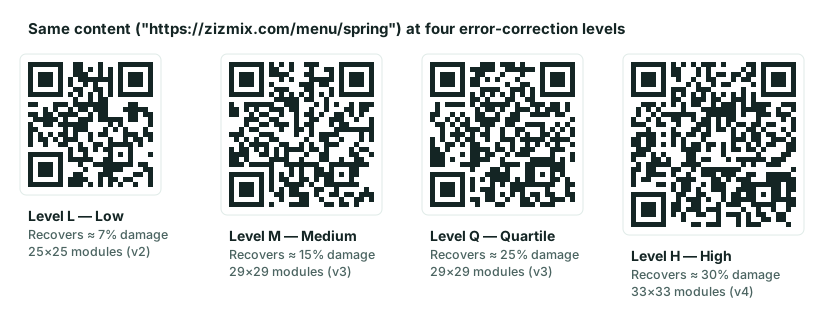
More recovery data means more modules. The same 30-character address that fits a 29×29 grid at level M needs 33×33 at level H in the diagram above. If you keep the printed width the same, every square is smaller, which is harder for a camera to resolve at a distance. Error correction therefore protects against damage but slightly increases the risk from distance and poor lighting. You are trading one risk for the other.
Capacity drops sharply too. At version 10 the byte capacity is 271 bytes at L, 213 at M, 151 at Q and 119 at H. See the complete numbers in how much data a QR code can hold.
How to choose
Choose M when…
You are printing a flyer, menu, business card or label that will be handled normally. It is the most common default for good reason: enough protection for scuffs and creases without a big size penalty.
Choose L when…
The code appears on a clean screen or glossy digital display and your content is long. Lowering to L can drop a version or two, making each module larger.
Choose Q or H when…
The code will be outdoors, on packaging that gets scratched, on a curved or textured surface, or on a vehicle. Also choose H if you add a logo (see how to add a logo safely), since the logo deliberately hides modules.
A common misconception
People sometimes assume level H means you can cover 30% of the code with anything. It does not. The 30% is the theoretical ceiling for the data blocks, and real-world conditions use up part of it: blur, glare, a tilted phone and an imperfect print all consume the correction budget before any deliberate damage. A conservative rule is to treat the budget as roughly half of the headline figure when you plan a logo or label overlay.
Testing is the only proof
Because the results depend on your printer, paper, lighting and phones, always scan a test print. Our generator lets you switch levels while watching the version and grid size change, and the capacity checker shows all four levels for your content side by side.
Frequently asked questions
Does higher error correction make a QR code more secure?
No. Error correction is about recovering from damage, not about secrecy. Anyone with a phone can read any QR code, whatever its level, so never put secrets in one you intend to keep private.
Can I change the error correction of a printed code?
No. The level is built into the pattern. To change it you must generate a new code and reprint. If you are unsure, choose M, or H if you expect a logo or heavy wear.
Why does my code look denser at level H?
Level H stores more recovery data, so the same content needs more modules. The extra squares are the recovery codewords, not extra information from you.
Try it: QR Capacity Checker — Paste a URL or text to see the QR version, grid size and error-correction options it needs.
Keep reading
Our guides give general information based on QR specifications, calculations and worked examples. Results depend on your printer, materials and devices, so always test a real print. See our editorial policy.