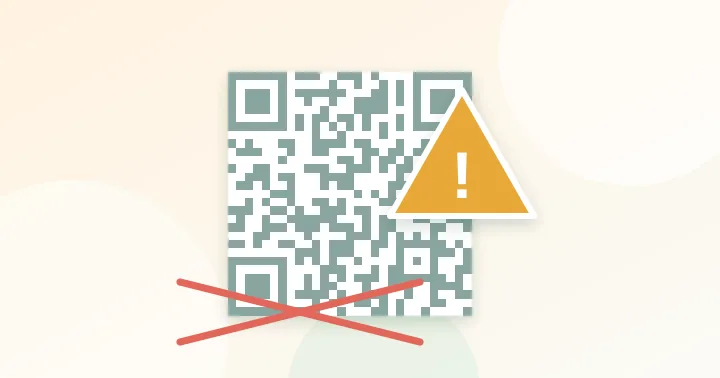
Most unscannable codes fail for one of five reasons: too small for the distance, too little contrast, no blank border, too much data, or a surface that reflects light. Work through the list below from the top.
When a code will not scan, the first instinct is to blame the phone. In practice the problem is almost always in the design or print, and it can be fixed in minutes. These are the nine causes we see most, in rough order of frequency.
1. It is too small for the distance
The code should be about one tenth as wide as the scanning distance. A 2 cm code on a poster viewed from 2 metres cannot be read reliably. Fix: use the size calculator and reprint at the recommended width. See the size guide.
2. Not enough contrast
Pale colours, grey on white, or a coloured code on a coloured background reduce the dark/light difference. Fix: aim for a 4.5:1 ratio or higher with the contrast checker.
3. The code is inverted
Light modules on a dark background fail on many older scanners. Fix: use dark on light, or test several devices.
4. No quiet zone
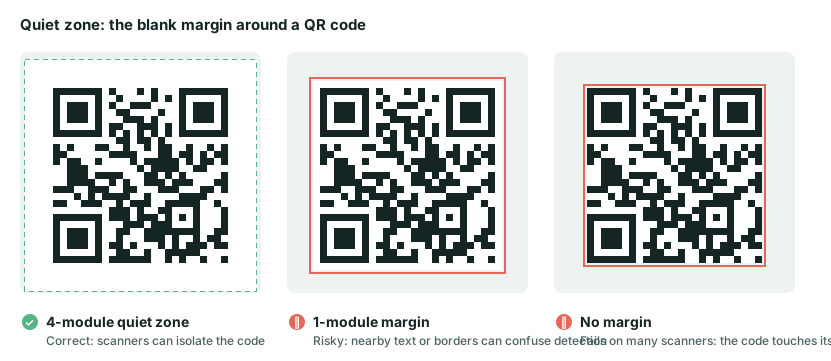
The code needs a blank margin of about four modules on every side. Designers often crop tightly, place a border, or put the code next to a line of text. Fix: add white space, and keep other elements outside it.
5. The content is too long
A tracking URL with many parameters can turn a 25×25 code into 57×57 or more. Each square shrinks, so it needs a larger print and better light. Fix: shorten the link, or redirect from a short path on your own domain. Check with the capacity checker.
6. Glare and glossy finishes
Gloss lamination under overhead spotlights bounces light directly into the lens. Fix: use matte stock or matte lamination and avoid placing the code directly under a light.
7. It was stretched or distorted
QR codes must stay square. Stretching a code in a layout program, or wrapping it around a tight curve, breaks the grid geometry. Fix: scale proportionally, and use level Q or H and a larger size on curved items.
8. A logo or sticker covers too much
Error correction has a limit, and blur, glare and tilt consume some of it before any logo does. Fix: keep any logo small and never cover the three corner squares. Read how to add a logo safely.
9. The destination is broken or slow
The code scans, but the page fails to load, redirects to a login, asks for a desktop-only app, or takes 10 seconds on mobile data. People assume the code is broken. Fix: open the destination on a phone over mobile data, not Wi-Fi, and make sure it is responsive and fast. For dynamic codes, confirm the redirect account is active.
A 60-second diagnostic
- Does it scan on a screen? If yes, the pattern is fine and the problem is print, size or lighting.
- Does it scan up close? If yes, it is a size or distance problem.
- Does it scan in bright light but not dim? Contrast or glare.
- Does it scan on one phone and not another? Density, contrast or inversion.
- Does it scan but go nowhere? The destination, not the code.
Prevention is cheaper than diagnosis: print one test at final size and scan it from the real distance before ordering the full run. For layout and call-to-action advice see QR code best practices for print marketing.
Frequently asked questions
Why does my code scan on an iPhone but not on an Android phone?
Phone cameras and scanner apps differ in how they handle small modules, low contrast and inverted codes. A code that is marginal on one device is often unreadable on another. Fix the underlying size or contrast issue rather than testing until one phone works.
Should I use a link shortener to make a dense code simpler?
Yes, if you control the short link. A short path on your own domain is ideal. Avoid free third-party shorteners for printed material, because the short link can change or disappear.
How much testing is enough before a print run?
Print one copy at final size and scan it from the real distance with at least two phones in normal and dim light. That takes a few minutes and catches nearly every problem.
Try it: QR Size Calculator — Work out the minimum print size for a QR code from the scanning distance and data length.
Keep reading
Our guides give general information based on QR specifications, calculations and worked examples. Results depend on your printer, materials and devices, so always test a real print. See our editorial policy.