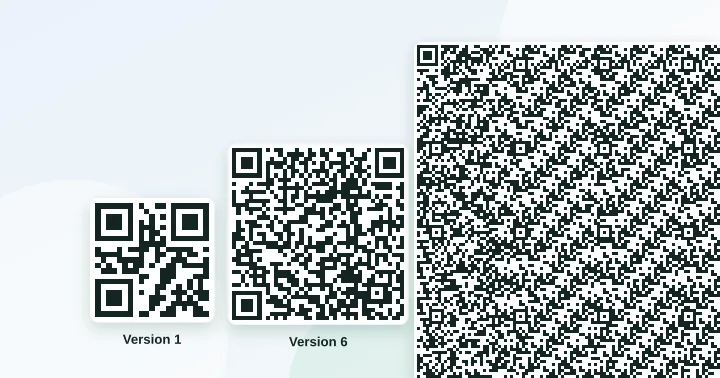
The largest QR code (version 40) holds up to 7,089 numeric digits, 4,296 alphanumeric characters or 2,953 bytes of text at error-correction level L. At level H the same code holds 3,057 digits, 1,852 alphanumeric characters or 1,273 bytes. In practice, keep content far below the limit.
Capacity depends on three choices: the version (grid size), the encoding mode (how efficiently the characters are packed) and the error-correction level. This page gives exact figures, which we verified by encoding test strings with the same library that powers our tools.
The three encoding modes
- Numeric: digits 0–9 only. About 3.3 bits per digit, the most compact.
- Alphanumeric: digits, capital letters A–Z and nine symbols (space $ % * + - . / :). About 5.5 bits per character.
- Byte: anything else, including lower-case letters and accents, stored as UTF-8. 8 bits per byte, and a non-Latin character may take 2 to 4 bytes.
A generator should choose the smallest mode that fits. That is why HTTPS://EXAMPLE.COM/A can fit a smaller code than https://example.com/a: capitals qualify for alphanumeric mode. Most web servers treat the domain as case-insensitive, but the path often is not, so only try this when you control the destination.
Capacity at the extremes
| Version 40 (177×177) | L | M | Q | H |
|---|---|---|---|---|
| Numeric (digits) | 7,089 | 5,596 | 3,993 | 3,057 |
| Alphanumeric | 4,296 | 3,391 | 2,420 | 1,852 |
| Byte (UTF-8) | 2,953 | 2,331 | 1,663 | 1,273 |
| Version 1 (21×21) | L | M | Q | H |
|---|---|---|---|---|
| Numeric (digits) | 41 | 34 | 27 | 17 |
| Alphanumeric | 25 | 20 | 16 | 10 |
| Byte | 17 | 14 | 11 | 7 |
Byte capacity by version
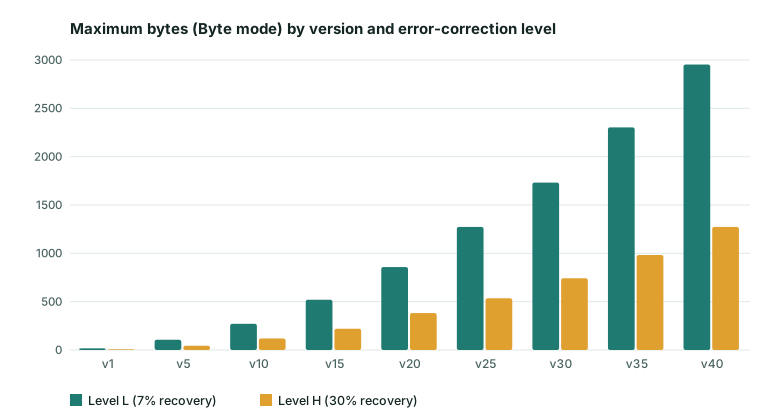
| Version | Grid | L | M | Q | H |
|---|---|---|---|---|---|
| 1 | 21×21 | 17 | 14 | 11 | 7 |
| 2 | 25×25 | 32 | 26 | 20 | 14 |
| 3 | 29×29 | 53 | 42 | 32 | 24 |
| 5 | 37×37 | 106 | 84 | 60 | 44 |
| 10 | 57×57 | 271 | 213 | 151 | 119 |
| 15 | 77×77 | 520 | 412 | 292 | 220 |
| 20 | 97×97 | 858 | 666 | 482 | 382 |
| 30 | 137×137 | 1,732 | 1,370 | 982 | 742 |
| 40 | 177×177 | 2,953 | 2,331 | 1,663 | 1,273 |
What real content needs
| Example | Length | Level M version |
|---|---|---|
https://zizmix.com | 18 chars | 2 (25×25) |
| Menu URL with a path | 30 chars | 3 (29×29) |
Wi-Fi payload (WIFI:T:WPA;S:CafeGuest;P:mocha2026;;) | 36 chars | 3 (29×29) |
| Restaurant URL, 58 characters | 58 chars | 4 (33×33) |
| Same URL with three UTM parameters | 113 chars | 7 (45×45) |
| A long URL with many parameters | 220 chars | 11 (61×61) |
The UTM example is the important one. Adding tracking parameters to a short address more than doubles the number of modules per side in the table above, which makes every square smaller at the same print size. If you need tracking, use a short path on your own domain that redirects to the full tracked URL (see tracking scans without a paid platform).
Bigger is not better
The maximum capacity is a technical limit, not a recommendation. A version 40 code is 177 modules wide; to keep each module at 0.4 mm you would need to print it at least 7 cm wide, and a phone would need to be close and well lit to read it. The rule of thumb is to design for the smallest version that fits, ideally version 2 to 5 for anything people scan in the real world. Long text belongs on a web page; the code should hold only a short address.
Paste your own content into the capacity checker to see the version it needs at all four levels, and then work out the print size with the size calculator.
Frequently asked questions
What is the longest URL I can put in a QR code?
Technically up to 2,953 bytes in byte mode at level L. In practice anything beyond about 100 characters produces a dense code that is hard to print small. Use a short path on your own domain that redirects to the full address.
Do accented and non-Latin characters take more space?
Yes. In UTF-8, basic Latin letters use one byte, accented letters usually two, most Chinese, Japanese and Korean characters three, and emoji four. A short Vietnamese or Chinese message therefore needs a larger version than the same number of English letters.
Why do two generators sometimes give different versions for the same text?
Because of settings: the error-correction level, whether they pick the densest encoding mode, and whether they force a minimum version. Our tools choose the smallest version that fits.
Check a capacity boundary yourself
At level L, 17 lowercase ASCII letters fit in a version-one byte-mode symbol (21 × 21 modules). An eighteenth letter requires a larger grid. Use lowercase text here: uppercase letters and digits can use denser QR modes, so their character counts are different.
The public verification page checks that boundary along with version-one byte capacities of 14, 11 and 7 bytes at levels M, Q and H. It also checks that 2,953 lowercase ASCII bytes fit at level L and 2,954 do not. These are encoder checks; they do not imply that a maximum-density code is practical to print small.
Try it: QR Capacity Checker — Paste a URL or text to see the QR version, grid size and error-correction options it needs.
Keep reading
Our guides give general information based on QR specifications, calculations and worked examples. Results depend on your printer, materials and devices, so always test a real print. See our editorial policy.