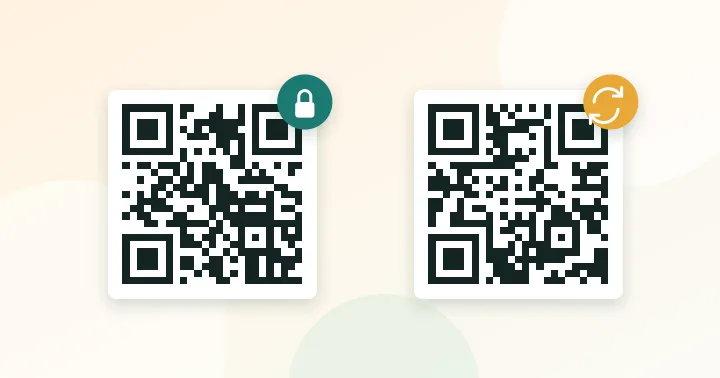
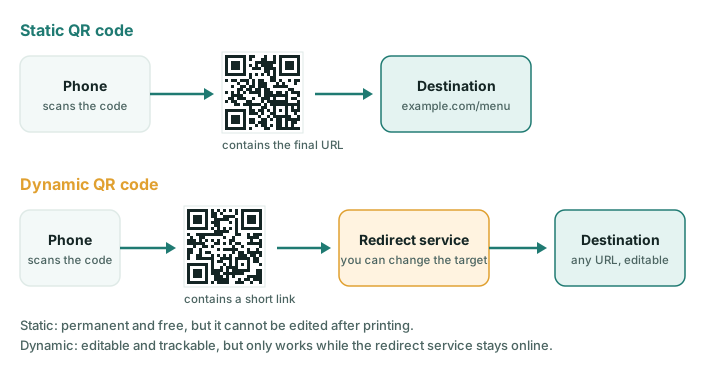
A static QR code contains your final content, so it never expires and cannot be changed. A dynamic QR code contains a short redirect link, so you can change the destination and count scans, but it stops working if the redirect service goes away or your plan lapses.
Both look identical to a scanner. The difference is what is inside the pattern and who controls the destination afterwards.
How a static code works
The URL, Wi-Fi details or text are written straight into the pattern. When you scan, your phone reads the content and acts on it. There is no server in the middle, so nothing can expire or be switched off. If your website stays online, the code keeps working for as long as the print lasts. The trade-off is that the content is fixed: if the address changes, you must reprint.
The generator on this site produces static codes.
How a dynamic code works
The code contains a short link such as qr.example/a1b2 on the provider’s domain. That server looks up the current destination and forwards the visitor. Because the redirect is under your control, you can change the target later and many providers record a count of scans, plus the device type and approximate location.
Side-by-side comparison
| Static | Dynamic | |
|---|---|---|
| Can you edit the destination? | No | Yes |
| Scan analytics | None built in | Usually included |
| Typical cost | Free | Often a subscription |
| Works if the provider closes? | Yes | No |
| Code density | Depends on content | Usually simple (short link) |
| Extra hop for the visitor | None | One redirect |
| Privacy | No third party | Provider sees every scan |
The risk nobody mentions: link rot at the provider
A dynamic code is a rental. If you stop paying, or the company changes its free tier, every printed code can start showing an error page or an advertisement. Printed materials last for years, so before you put a dynamic code on 5,000 boxes ask: who owns the redirect domain, what happens if the account lapses, and can I export the links?
A free middle path
You can get most of the flexibility of a dynamic code without paying a third party. Put a short, permanent path on your own domain into a static code — for example yourshop.com/menu — and make that page (or a redirect) point wherever you want today. You can change the target at any time, you control the domain, and the code stays short. You only lose the provider’s built-in analytics, which you can replace with your own web analytics as described in how to track QR code scans.
A simple decision framework
- Will the destination ever change after printing? If no, use static.
- Do you need scan counts by code or location? If yes and you cannot use your own analytics, consider dynamic.
- Is the print permanent or expensive to replace (packaging, signage, vehicles)? Use a path on your own domain, whichever type you pick.
- Is privacy important (hospitals, schools, internal tools)? Prefer static or your own redirect.
Typical choices
- Wi-Fi password at home or a cafe: static (Wi-Fi codes cannot be dynamic in the usual sense).
- Business card: static pointing to your own domain.
- Seasonal restaurant menu: static pointing to
/menuon your site, updated in place. See our menu guide. - Multi-city ad campaign with separate tracking: either one tracked URL per placement (static) or a dynamic platform.
Whichever you choose, check the final result before printing with the contrast checker and the size calculator.
Frequently asked questions
Can I turn a static QR code into a dynamic one?
No. A static code contains the final content permanently. To get editable behaviour you must create a new code that points at a redirect you control, then reprint where necessary.
Are dynamic QR codes slower to scan?
Reading the code is the same. After it, the phone makes one extra request to the redirect service before reaching the destination. It is usually barely noticeable, but it is one more thing that can fail.
What happens to a dynamic code if I stop paying?
That depends on the provider. Some keep redirecting for a limited time, some switch off the link or show their own page. Read the terms before printing at scale, or use a redirect on your own domain.
Try it: QR Code Generator — Create QR codes for links, text, Wi-Fi, contacts, email, phone and SMS. Download PNG or SVG.
Keep reading
Our guides give general information based on QR specifications, calculations and worked examples. Results depend on your printer, materials and devices, so always test a real print. See our editorial policy.