Review QR Query Parameters Before Increasing Print Size
Inspect unnecessary URL parameters, preserve required behavior, and compare newly generated symbols before changing the layout.
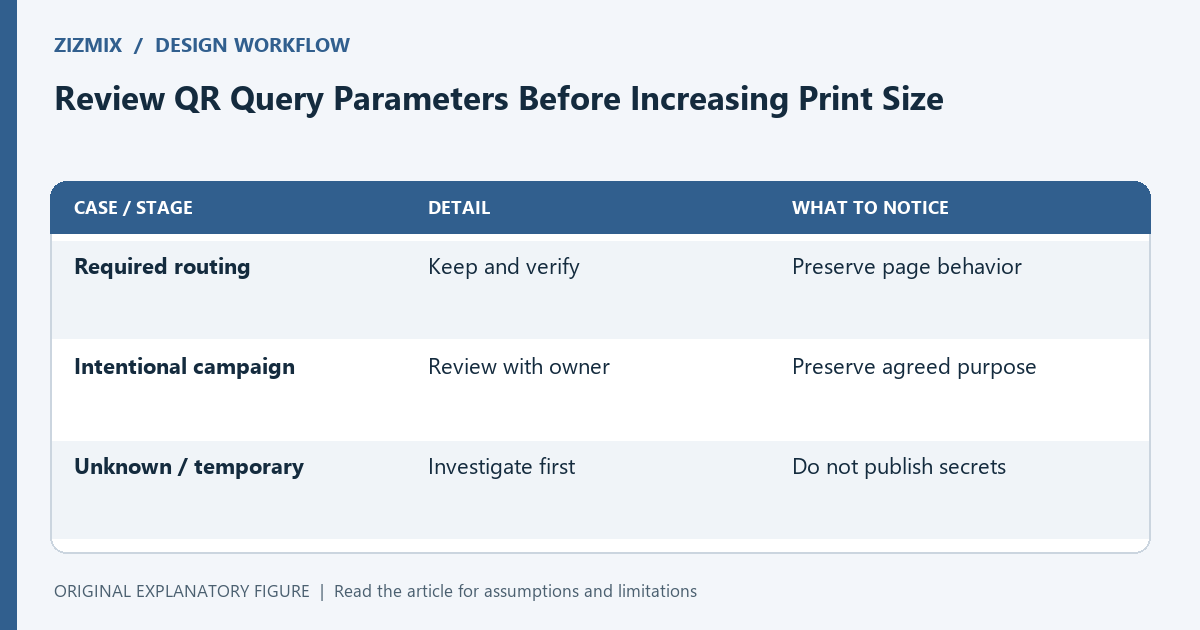
A long URL can produce a denser QR symbol than a short URL with the same purpose. Before enlarging a layout, review what the address actually contains. Some parameters may be necessary, while others may be accidental duplication. This guide is a payload audit, not a recommendation to remove measurement or routing information without checking the receiving system.
Copy the decoded payload
Scan the current code and save the exact decoded text. Compare it with the address you intended to encode. A designer may have copied a link from a signed-in session or a campaign tool rather than the public destination.
Separate scheme, host, path, and query parameters. Do not shorten the address by removing characters blindly. A missing parameter can change language, product selection, access behavior, or the page itself.
Classify every query entry
For each entry, write its purpose and whether you have verified that purpose. Group required routing, intentional campaign labels, and unknown values. Repeated keys may be meaningful, so do not flatten them into one value during inspection.
If a parameter contains private or temporary session information, do not publish it in a printed code. Resolve the public destination through the appropriate system. If you are unsure what an entry does, ask the page owner or test a safe development equivalent before removing it.
Compare candidate destinations
Create a base address and a proposed cleaned address. Open both in fresh sessions and compare the promised task. Check redirects and any selected state. A matching page title alone does not establish equivalent behavior.
Keep campaign requirements explicit. A shorter address may lose an intentional measurement distinction. If you use a controlled short path that redirects, document who maintains it and what happens when content moves. The redirect introduces an ongoing dependency.
Regenerate rather than resizing blindly
Generate a new QR for the verified candidate. Compare symbol density, margin, and the final physical size. Payload length is only one factor; encoding choices and error-correction settings also affect the symbol.
Use the capacity checker to inspect the candidate and the size calculator to plan the print. Do not infer an exact symbol version from character count alone when you have not controlled the encoding details. The generated asset is the practical object to test.
Repeat the print acceptance check
A cleaned URL produces a new symbol, so treat it as a new asset. Test the final export and physical proof under the intended conditions. Confirm the visible fallback and action label still match.
Save the original payload, approved payload, reason for each removed parameter, and tested file. That record protects against a later argument about missing behavior. The goal is a deliberate destination and a usable print, rather than the shortest possible URL at any cost.
| Case or stage | Detail | What to notice |
|---|---|---|
| Required routing | Keep and verify | Preserve page behavior |
| Intentional campaign | Review with owner | Preserve agreed purpose |
| Unknown / temporary | Investigate first | Do not publish secrets |